
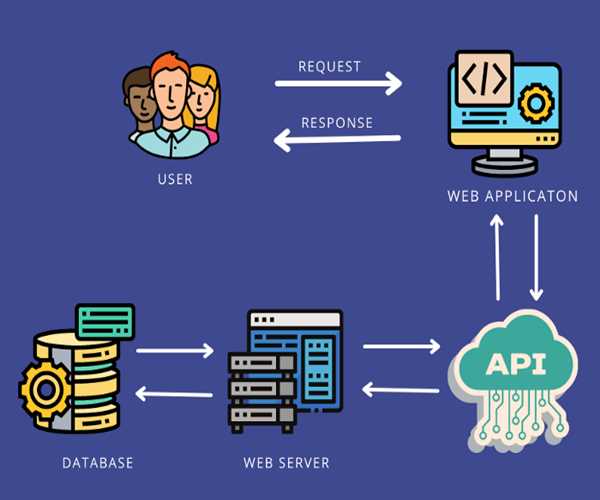
The FormData API in JavaScript provides a way to easily construct a set of key/value pairs representing form fields and their values, which can then be sent using the
XMLHttpRequest or fetch API. This is particularly useful for sending form data via AJAX requests without needing to manually serialize the form data.
Creating and Using FormData
To use the FormData API, you typically follow these steps:
- Create a FormData object: You can create it from a form element or manually.
- Append data: Add key/value pairs to the
FormDataobject. - Send data via AJAX: Use
XMLHttpRequestorfetchto send theFormDataobject.
Example: Using FormData with fetch
HTML Form
<!doctype html>
<html lang="en">
  <head>
    <meta charset="utf-8">
    <meta name="viewport" content="width=device-width, initial-scale=1">
    <title>JavaScript Ajax Demo</title>
    <link href="https://cdn.jsdelivr.net/npm/bootstrap@5.3.3/dist/css/bootstrap.min.css" rel="stylesheet" integrity="sha384-QWTKZyjpPEjISv5WaRU9OFeRpok6YctnYmDr5pNlyT2bRjXh0JMhjY6hW+ALEwIH" crossorigin="anonymous">
    <link rel="stylesheet" href="https://cdn.jsdelivr.net/npm/bootstrap-icons@1.11.3/font/bootstrap-icons.min.css">
    <style type="text/css">
    	.todo-item{
    		display: flex;
    	}
    	.todo-item.completed .todo-item-title{
    		text-decoration: line-through;
    	}
    </style>
  </head>
  <body>
    <div class="container mt-4">
    		<div>
    			<div class="d-flex justify-content-between">
    				<h1>Ajax Data</h1>
    			</div>
    			<hr/>
    		</div>
    		<div>
    			<!-- Add new todo data  -->
    			<div class="mb-3">
    				<form id="myForm">
    					<input type="hidden" name="userId" id="userId" value="1" />
    					<input type="hidden" name="id" id="id" value="0" />
    					<input type="hidden" name="completed" id="completed" value="false">
    					<div class="d-flex">
    						<input type="text" name="title" id="title" placeholder="Add a task" class="form-control" required />
    						<button type="submit" class="btn btn-primary ms-3">Add</button>
    					</div>
    				</form>
    				<hr/>
    			</div>
    			<!-- Show All todos -->
    			<div class="row g-3 todo-list" id="dynamic-area">
    			</div>
    		</div>
    </div>
  </body>
  <script src="JavaScript-ajax.js"></script>
</html>
JavaScript for Handling Form Submission (JavaScript-ajax.js)
document.addEventListener('DOMContentLoaded', function() {

var responseData = [];

    // Load data from REST APIs
    fetch('https://jsonplaceholder.typicode.com/todos', {
        method: 'GET'
    })
    .then(response => response.json())
    .then(data => {
        //console.log('Success:', data);
        BindDatainHtmlPage(data);
        responseData = data;
    })
    .catch(error => {
        console.error('Error:', error);
    });

    function BindDatainHtmlPage(data){
        // Using querySelectorAll (returns a static NodeList)
        const elementsToRemove = document.querySelectorAll('.todo-item');
        elementsToRemove.forEach(element => element.remove());

        const area = document.getElementById('dynamic-area');
        for(item of data){
            var html = `<div class="todo-item ${ item.completed ? 'completed' : ''} ">
                        <div class="d-flex w-100 py-2 border-bottom" data-user-id="${item.userId}" data-post-id="${item.id}">
                            <span class="todo-icon mx-2 my-auto">
                                <i class="bi ${ item.completed ? ' bi-check-circle-fill text-success' : ' bi-circle'}"></i>
                            </span>
                            <p class="todo-item-title m-0 w-100 ">${item.title}</p>
                        </div>
                    </div>`;
            area.insertAdjacentHTML('afterbegin', html);
        }

    }

    const form = document.getElementById('myForm');
    form.addEventListener('submit', function(event) {
        event.preventDefault(); // Prevent the default form submission

        // Create a new FormData object from the form element
        const formData = new FormData(form);
        var newTodoItem = Object.fromEntries(formData.entries());

        // Send the form data using fetch
        fetch('https://jsonplaceholder.typicode.com/todos', {
            method: 'POST',
            body: formData
        })
        .then(response => response.json())
        .then(data => {
            //console.log('Success:', data);
            newTodoItem['id'] = parseInt(data.id);
            responseData.push(newTodoItem);
            BindDatainHtmlPage(responseData);
            form.reset();
        })
        .catch(error => {
            console.error('Error:', error);
        });
    });
});

Explanation
HTML Form:
- The form (
#myForm) includes input fields for the title, id, userid, and a submit button.
JavaScript for Handling Form Submission:
- An event listener is added to the form to handle the
submitevent. event.preventDefault()prevents the default form submission behavior, allowing you to handle it with JavaScript.- A new
FormDataobject is created from the form element, automatically capturing the form fields and their values. - The
FormDataobject can be inspected using afor...ofloop, which iterates over its entries (key/value pairs). - The
fetchAPI is used to send the form data to a server endpoint.method: 'POST'specifies the HTTP method.body: formDatasets the request body to theFormDataobject.
- The response is handled with
.then()for a successful request and.catch()for errors.
Benefits of Using FormData
- Simplifies Data Handling: Automatically captures form fields and their values, including files (for file uploads).
- Flexible: Can be used with
XMLHttpRequestandfetch. - Supports Various Data Types: Easily handles different types of input fields, including text, files, and more.
- Readable Code: Makes your AJAX requests cleaner and easier to understand.
Using the FormData API is a powerful way to manage and submit form data via AJAX in modern web applications, streamlining the process of collecting and sending user input to the server.
Read also,
How can you perform client-side form validation in JavaScript?
How can you dynamically add and remove form fields using JavaScript?
Describe how to implement a stack and a queue in JavaScript using arrays


Leave Comment